View & Manage Deterioration Curves
Roadsoft users can automatically generate projected deterioration curves for road segments from within the Road Module. These printable curves are based on user-defined treatment and rating data. Deterioration curves include a default curve, a curve for treatment inferred from rating and the critical distress point year and rating.
View Deterioration Curve for a Segment
Make the Road layer visible and active.
Using the Selection tool, select the road segment that you want to adjust.
Select the View Module button (or right-click, View Module) to open the road module.
Select the Curve button. The Deterioration Curve window will open. 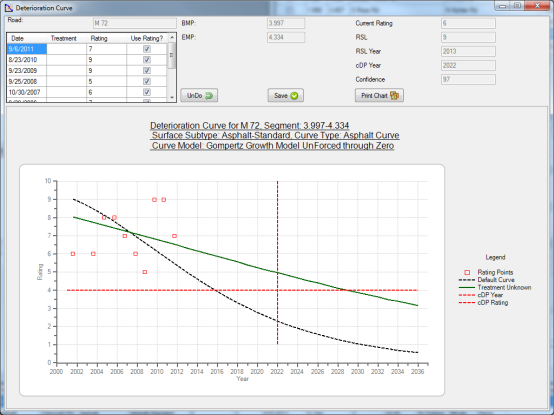
In the table in the top left corner, check or uncheck the boxes in the Use Rating? column.
Select Save.
This will determine which ratings to use in determining the curve. This can be useful if you have a very clear outlier in your rating data.
Open the Curve Definition Window
In the main Roadsoft window, select Asset Management in the menu bar.
Select Pavement Management.
Select Deterioration Curve Definition… This will open the Curve Definition window.
Create/Edit Curves
Either select the Add New Curve button in the middle of the Curve Definition window to create a new curve or select an option from the Curve Name drop down menu in the top-right corner of the Curve Definition window.
In the top left table, alter values as necessary to adjust the curve.
Select the Save Curve Definition window. This will open the Save and Name Curve window.
Delete Curves
Select the Delete Curve Definition button in the middle of the Curve Definition window.
The Delete Saved Curve window will open. Select the curve you wish to delete and select the Delete button.
Roadsoft will ask “Delete Saved Curve [curvename]?” Select either Yes or No.
Assign Curves for Surface Types and Surface Sub-types
In the Curve Definition window, under Curve Assignments, select a curve next to a surface sub-type, and select a curve from the drop-down menu.
When done changing curve assignments, select the Update button.